Case study · Jul 2026 – Oct 2026
The Jockey Club: Coupa and NetSuite, connected end to end through Celigo.
A bidirectional source-to-pay integration I designed, built and took live as architect and lead developer: 24 Celigo flows covering suppliers, chart of accounts, invoices, payments, expenses and budgets across nine group entities.
1The challenge
The Jockey Club runs procurement, supplier onboarding, invoicing and expenses in Coupa, and its ledger in NetSuite OneWorld across nine group entities. The two systems needed to work as one source-to-pay process: suppliers created once and paid only when Finance is satisfied, spend coded only to combinations NetSuite will accept, and every invoice, credit, payment, expense and budget landing in the right subsidiary.
Across nine entities that left no room for shortcuts: no hard-coded crosswalks to maintain, no duplicate postings when a run is retried, and a way for Finance and support to see the health of every flow without logging in to Celigo.
2The approach
Celigo integrator.io carries the data; NetSuite holds the rules. Every flow uses JavaScript hooks, lookups and filters, and every flow is idempotent by design, so a re-run updates rather than duplicates.
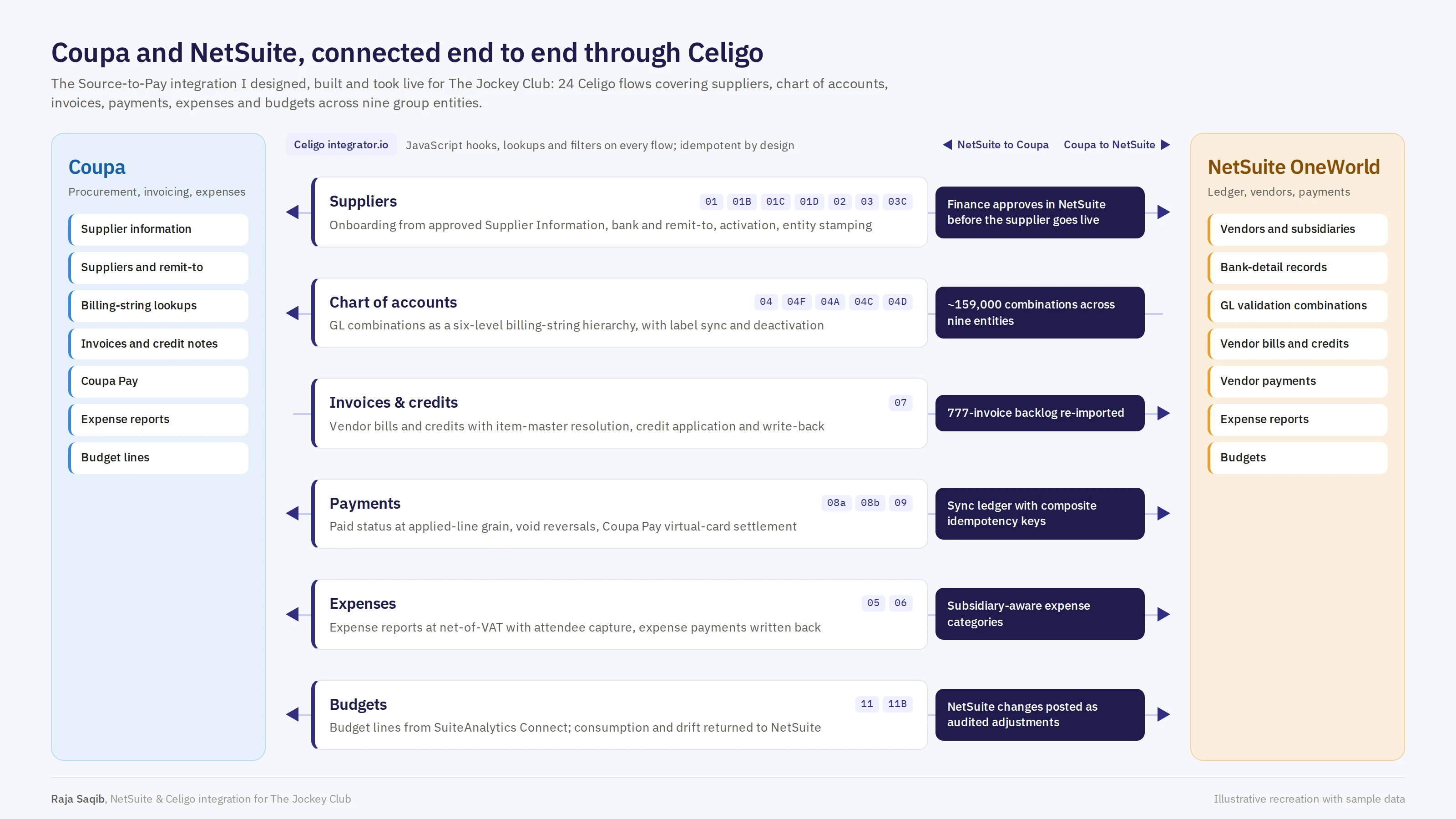
On the NetSuite side, ten SuiteScript 2.1 scripts and a set of custom records give the integration its controls, logs and operating console. One house rule ran through the whole build: every integration value lives in a new, purpose-built field. Legacy procurement fields were never reused, so old and new data cannot collide.
3What was built
Supplier onboarding, gated by Finance
A new supplier never becomes payable until Finance has verified the bank details in NetSuite. Celigo moves the record between the two systems at each step (flows 01, 01B, 01C, 01D, 02, 03 and 03C).
- An approved Coupa Supplier Information record creates the NetSuite vendor, held Inactive and Pending Approval with Bank Details Changed until Finance signs off through the existing approval workflow.
- Remit-to addresses and tax registrations are pushed to the Coupa supplier, and remit-to accounts land as NetSuite Electronic Bank Payments bank-detail records in primary and secondary payment-file formats.
- Fingerprint-based change detection re-flags the vendor for Finance verification on any bank change, and retired accounts are deactivated.
- Once Finance approves, Celigo activates the Coupa supplier, defaults the SRP tax code for GB suppliers, marks the supplier and SIM exported, and mirrors the live Coupa status back to NetSuite.
- Multi-subsidiary vendors: Coupa legal entities are crosswalked to NetSuite subsidiaries and stamped back onto the Coupa supplier as chart-of-accounts and content-group visibility. Supplier edits sync in both directions with echo-loop and convergence guards.
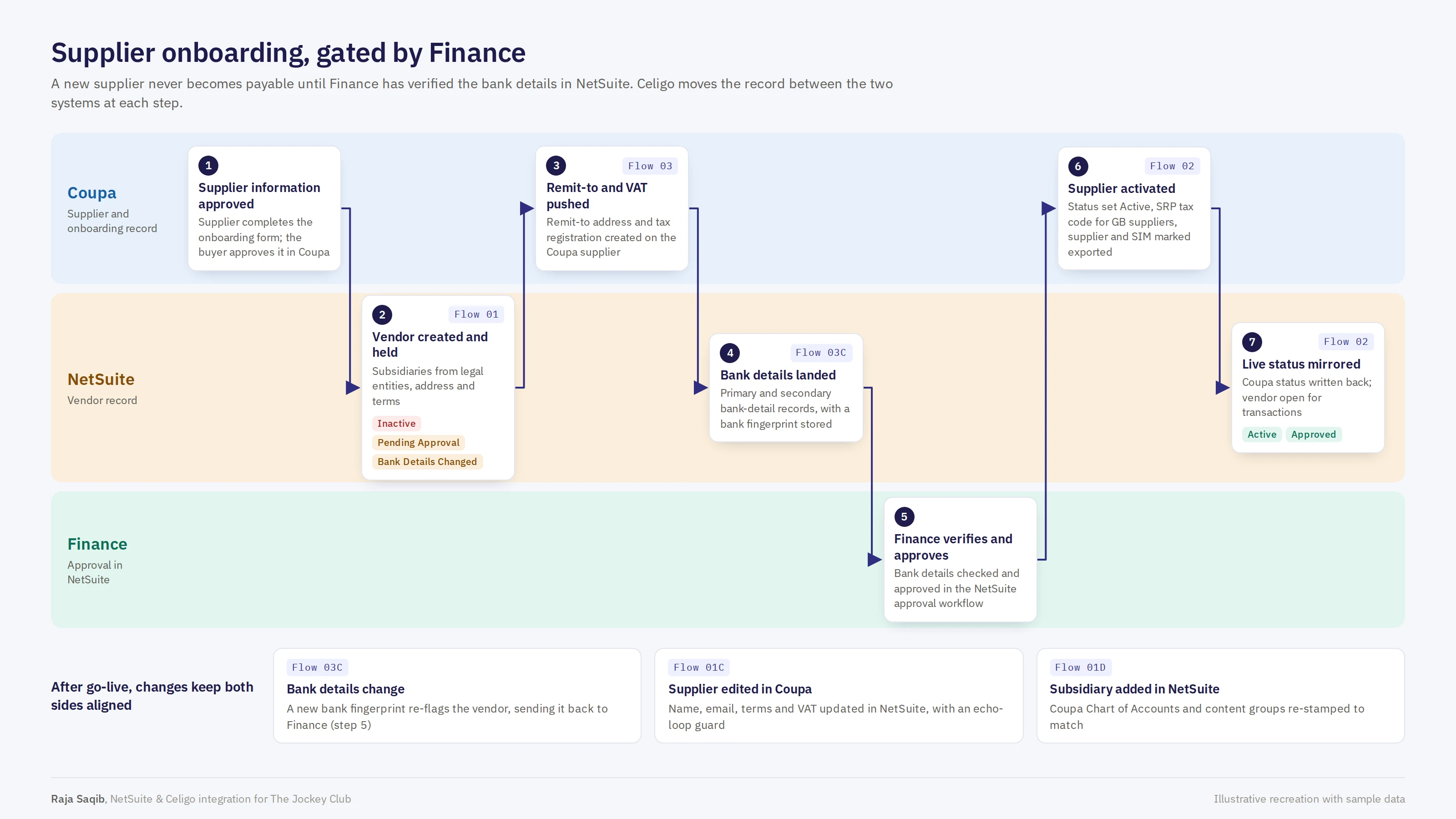
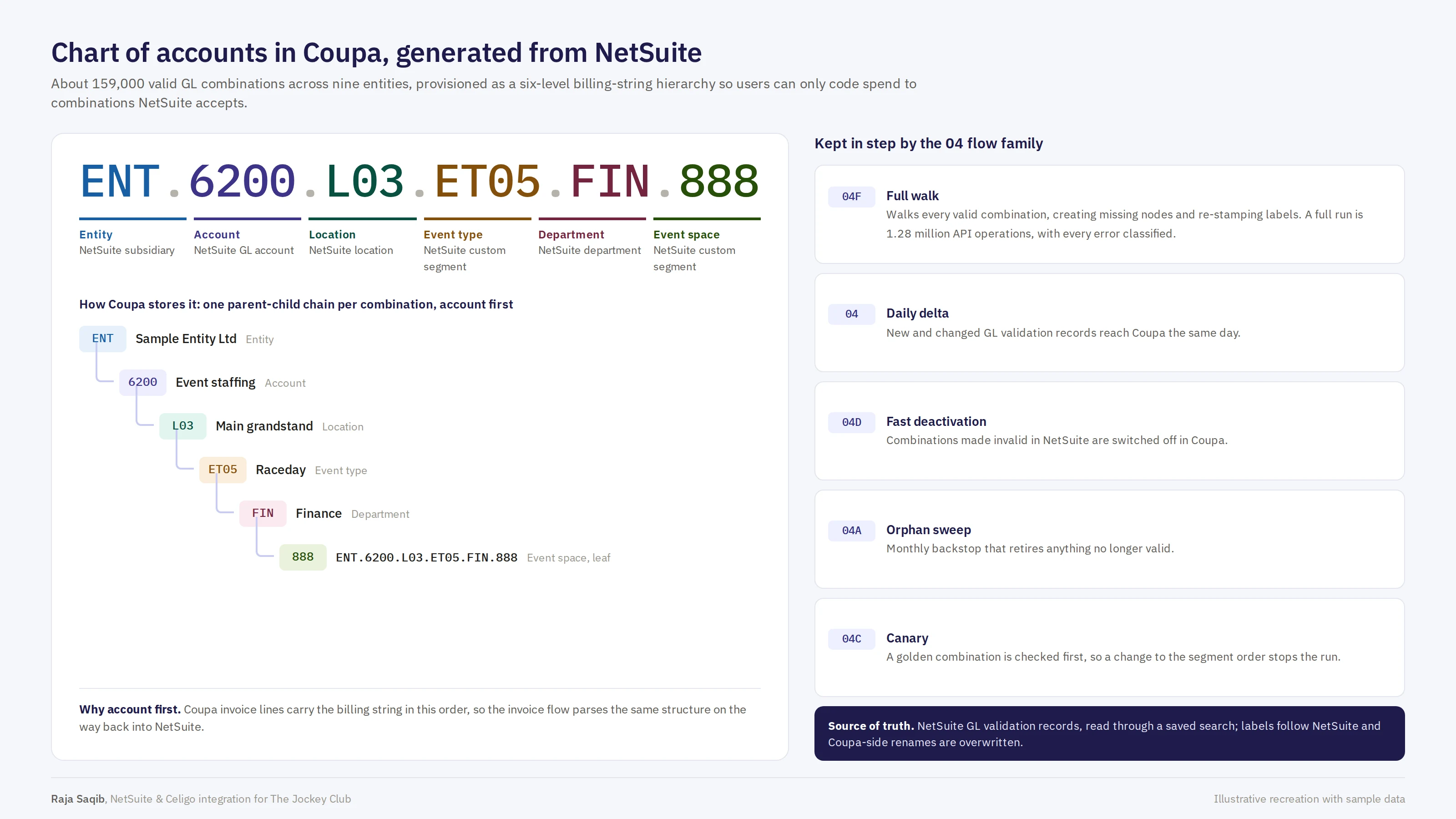
Chart of accounts in Coupa, generated from NetSuite
About 159,000 valid GL combinations across nine entities are provisioned in Coupa as a six-level billing-string hierarchy — Entity › Account › Location › Event Type › Department › Event Space — so users can only code spend to combinations NetSuite accepts.
- Full walk (04F) — walks every valid combination, creating missing nodes and re-stamping labels: 1.28 million API operations per run, with every error classified.
- Daily delta (04) — new and changed GL validation records reach Coupa the same day.
- Fast deactivation (04D) and orphan sweep (04A) — combinations NetSuite no longer accepts are switched off in Coupa, with a monthly backstop for anything left behind.
- Golden-record canary (04C) — a known combination is checked first, so a change to the segment order stops the run before it can do damage.
- NetSuite is the source of truth — GL validation records are read through a saved search; labels follow NetSuite and Coupa-side renames are overwritten.
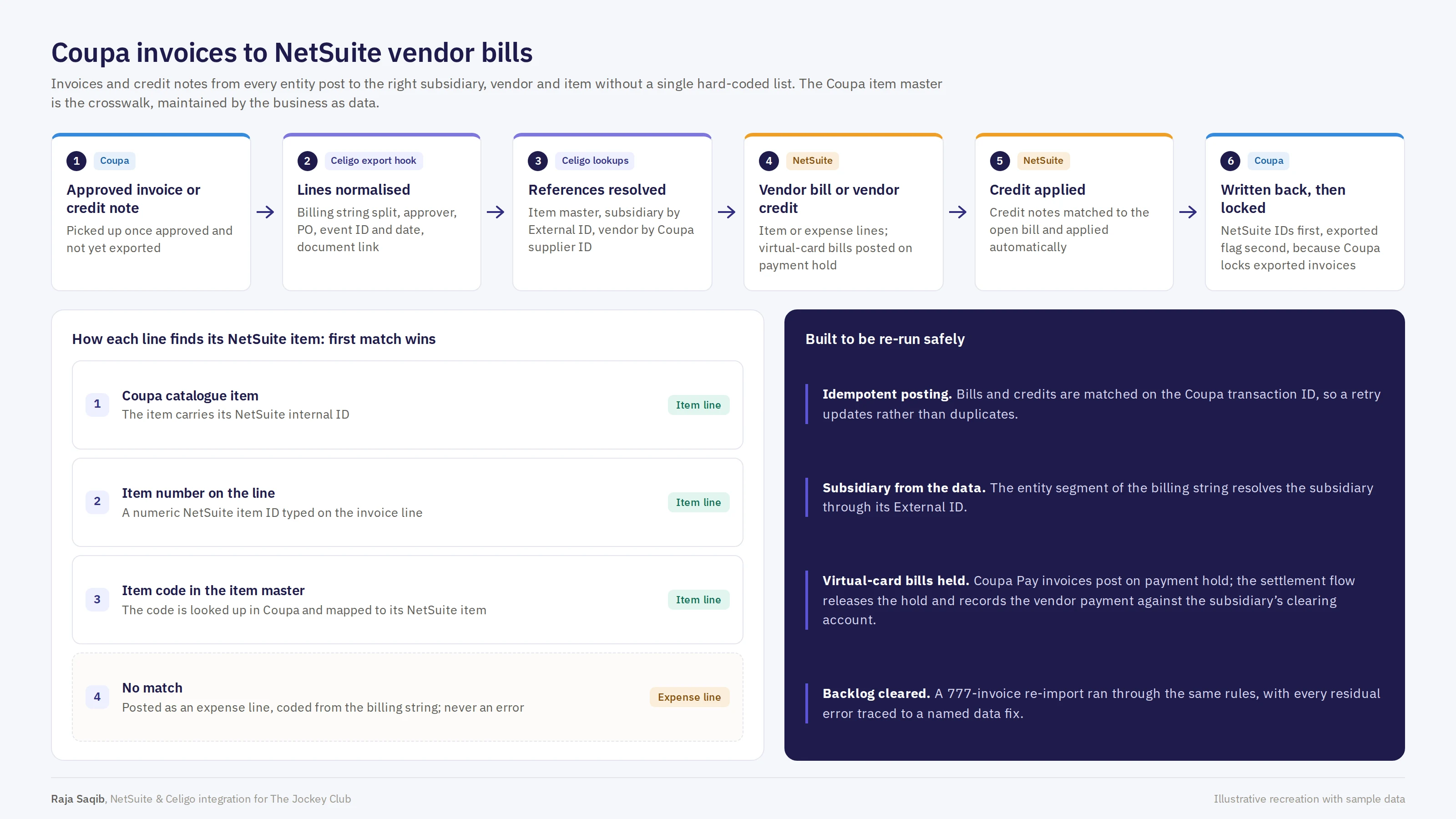
Coupa invoices to NetSuite vendor bills
Invoices and credit notes from every entity post to the right subsidiary, vendor and item without a single hard-coded list (flow 07). The Coupa item master is the crosswalk, maintained by the business as data.
- The subsidiary is resolved from the entity segment of the billing string through its External ID, and the vendor through the Coupa supplier ID.
- Each line finds its NetSuite item by first match: a Coupa catalogue item, an item number on the line, or an item code in the item master. A line with no match posts as an expense line coded from the billing string, never as an error.
- Credit notes are matched to the open bill and applied automatically.
- Posting is idempotent: bills and credits are matched on the Coupa transaction ID, so a retry updates rather than duplicates. NetSuite IDs are written back first and the exported flag second, because Coupa locks exported invoices.
- Coupa Pay virtual-card invoices post on payment hold until the settlement flow releases them.
- A 777-invoice backlog was re-imported through the same rules, with every residual error traced to a named data fix.
Payments, expenses and budgets
- Payments (08a, 08b, 09) — paid status written back to Coupa at applied-line grain, voids and reversals handled, and Coupa Pay virtual-card settlement recorded against each subsidiary's clearing account. A payment sync ledger with composite idempotency keys makes every write-back safe to repeat.
- Expenses (05, 06) — expense reports post net of VAT with subsidiary-aware expense categories and attendee capture, and expense payments are written back to Coupa.
- Budgets (11, 11B) — budget lines flow from SuiteAnalytics Connect to Coupa, consumption and drift come back to NetSuite, and NetSuite-side changes post as audited adjustments.
What was built inside NetSuite
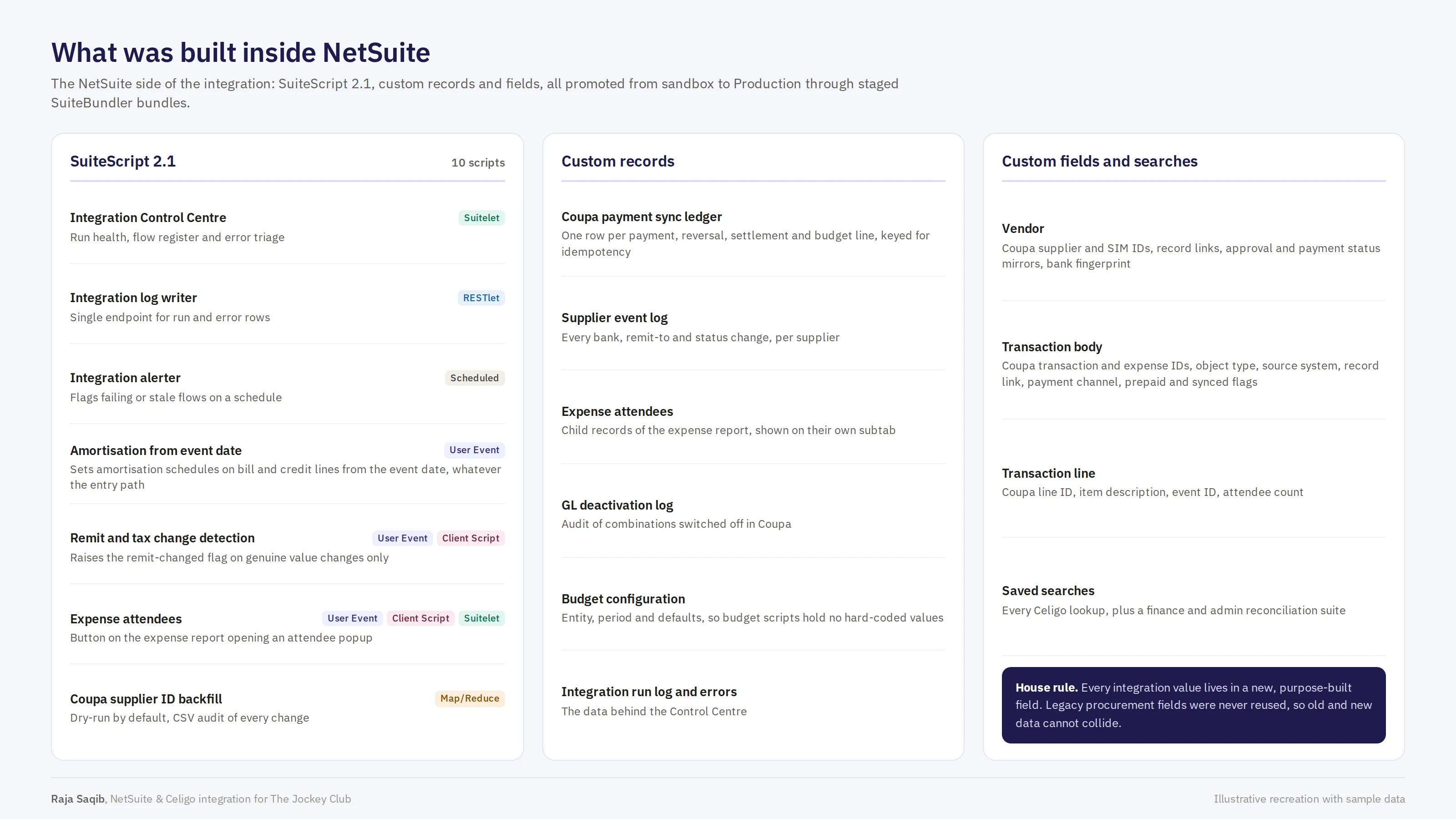
Ten SuiteScript 2.1 scripts and six custom records, all promoted from sandbox to production through staged SuiteBundler bundles.
- The Integration Control Centre (Suitelet), an integration log writer (RESTlet) and a scheduled alerter that flags failing or stale flows.
- An amortisation User Event that sets schedules on bill and credit lines from the event date, whatever the entry path.
- Remit and tax change detection that raises the flag only on genuine value changes, and an attendee popup on the expense report.
- A Coupa supplier ID backfill (Map/Reduce) that runs as a dry run by default and writes a CSV audit of every change.
- Custom records for the payment sync ledger, supplier event log, expense attendees, GL deactivation log, budget configuration, and the integration run log and errors behind the Control Centre.
4The Integration Control Centre
A NetSuite Suitelet, built in SuiteScript 2.1, that gives Finance and support one view of every Celigo flow — run health, a register of every production flow, and error triage with a suggested fix — without logging in to Celigo.
Overview
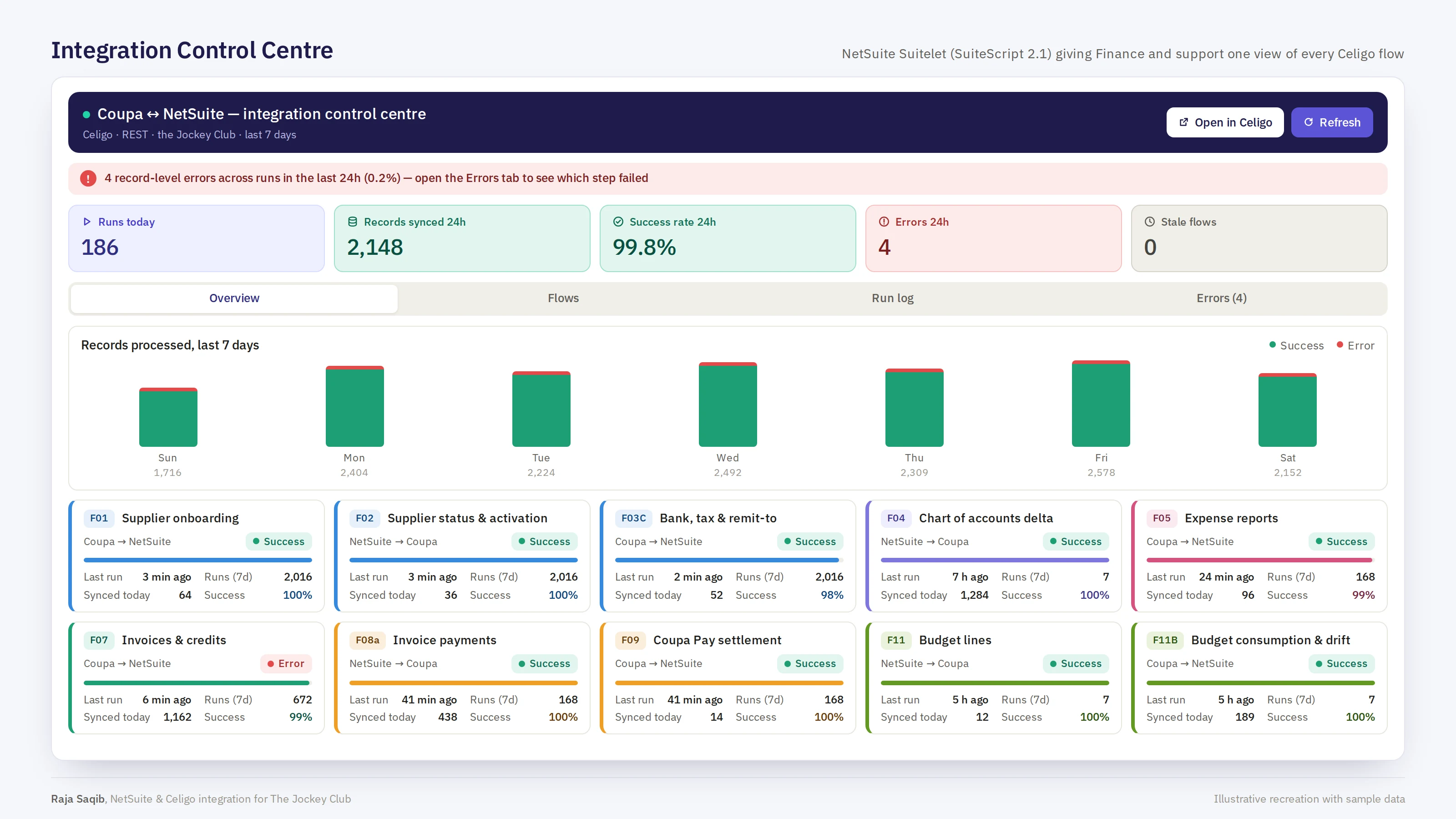
Flow register

Error triage
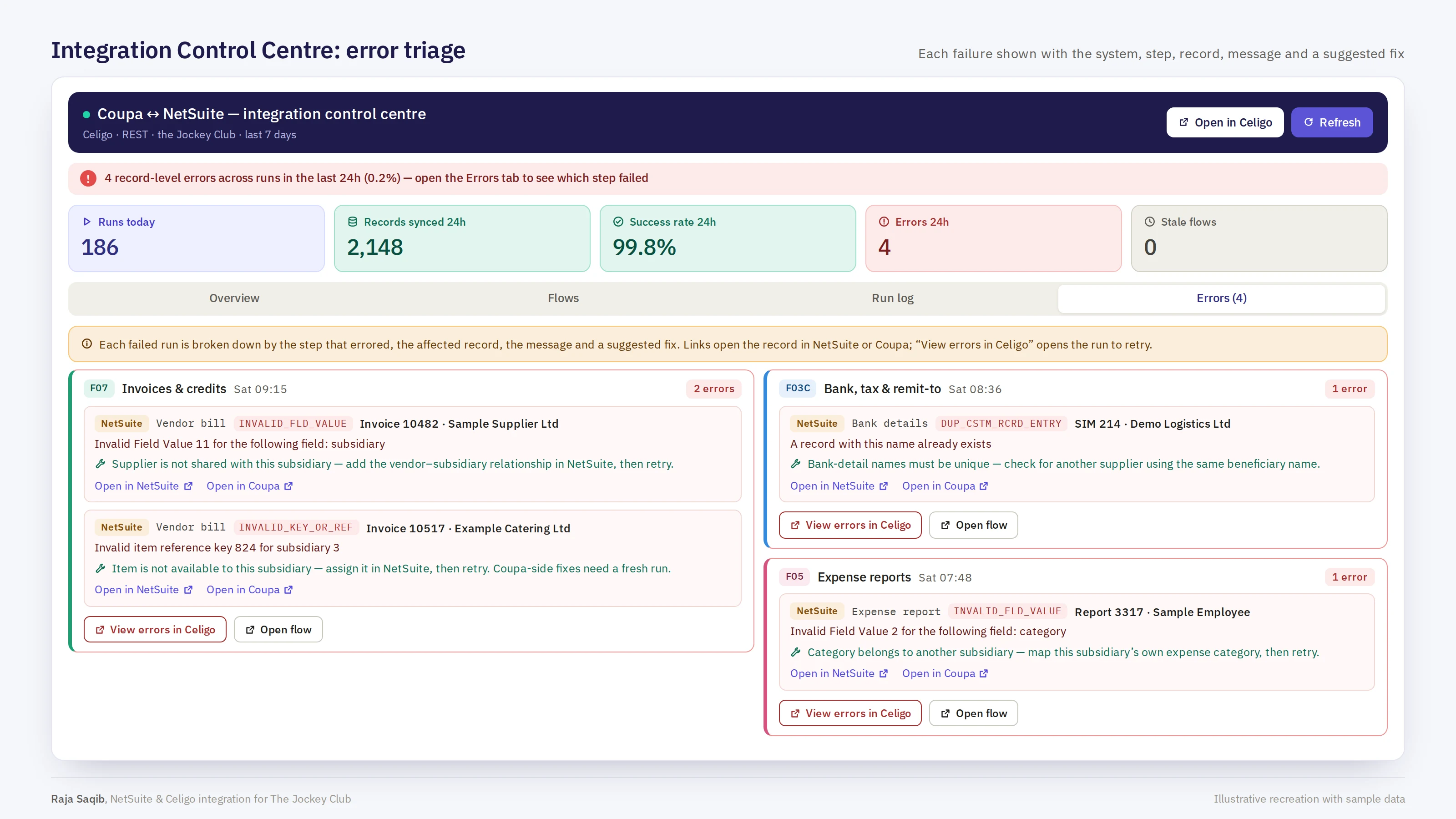
Screens on this page are illustrative recreations with sample data.
5Taking it live
- Owned end to end: design and build, UAT remediation, production migration and go-live.
- Production migration through staged SuiteBundler bundles, plus a Node.js tool that converts the sandbox Celigo build for production with fail-closed validation.
- An Integration Requirements Document for Coupa's move-to-production review, with runbooks, SIT scripts and reconciliation searches for Finance and support.
6The outcome
Finance controls who gets paid
No supplier becomes payable until Finance has verified its bank details in NetSuite, and any later bank change sends it back for verification.
Spend coded right first time
Coupa users can only choose GL combinations NetSuite accepts, kept in step daily and checked by a full walk.
No hard-coded crosswalks
Subsidiaries, vendors and items resolve from data, so new entities and items need no code change.
Safe to re-run
Idempotent posting and a sync ledger with composite keys mean a retry updates rather than duplicates.
One view for Finance and support
The Integration Control Centre shows every flow's health and every error with a suggested fix, inside NetSuite.
A clean go-live
Staged bundles and a fail-closed promotion tool took the build to production, and a 777-invoice backlog was re-imported through the same rules.
7Technologies used
"Finance should never have to open Celigo to know whether the integration is healthy. Every flow, every error and every fix is visible inside NetSuite, and no supplier gets paid until Finance says so."