Fixed-scope offer · Integration Rescue Sprint
Integration Rescue Sprint: stabilise failing NetSuite integrations in one to two weeks.
Hands-on help from a NetSuite integration consultant for Celigo, Dell Boomi and native SuiteScript integrations that fail, duplicate records or fail without anyone noticing. I find the root causes, fix them, clear the backlog safely, and leave you with monitoring and documentation.
1Is it right for you?
Built for integrations that work most of the time, which is the hardest kind to trust:
- The integration error queue grows every day
- Records are duplicated or missing between systems
- Your finance team re-keys data that should flow automatically
- Integrations run, but the numbers don't match between systems
- Nobody fully understands how the flows work
- You're paying for an iPaaS licence and wondering if native would be cheaper
2What I check and fix
Works with Celigo integrator.io, Dell Boomi, native SuiteScript 2.1 (RESTlets, Map/Reduce, scheduled and user event scripts) and SuiteTalk REST/SOAP. I've connected NetSuite to Salesforce, HubSpot, Shopify, Coupa, Fortnox, banks, 3PLs, Concur, Expensify and EDI partners.
Flow inventory
- Every flow, its direction, schedule and owner
- The records and fields each flow touches
- Dependencies between flows
Error analysis
- Errors grouped by root cause, not by message
- Volumes and trends over the last 30 days
- Silent failures and ignored records
Mappings and lookups
- Field mappings and cross-references
- Subsidiary, currency and tax handling
- Item, vendor and customer matching
Duplicate protection
- Idempotency keys and external IDs
- Retry behaviour and partial failures
- Echo loops between two-way flows
Authentication and limits
- Token-based authentication and OAuth
- Concurrency and governance limits
- Scheduling around peak hours
Backlog recovery
- Failed records re-run safely
- Counts reconciled on both sides
- Corrections where data already diverged
Monitoring
- Alerts when a flow fails or goes stale
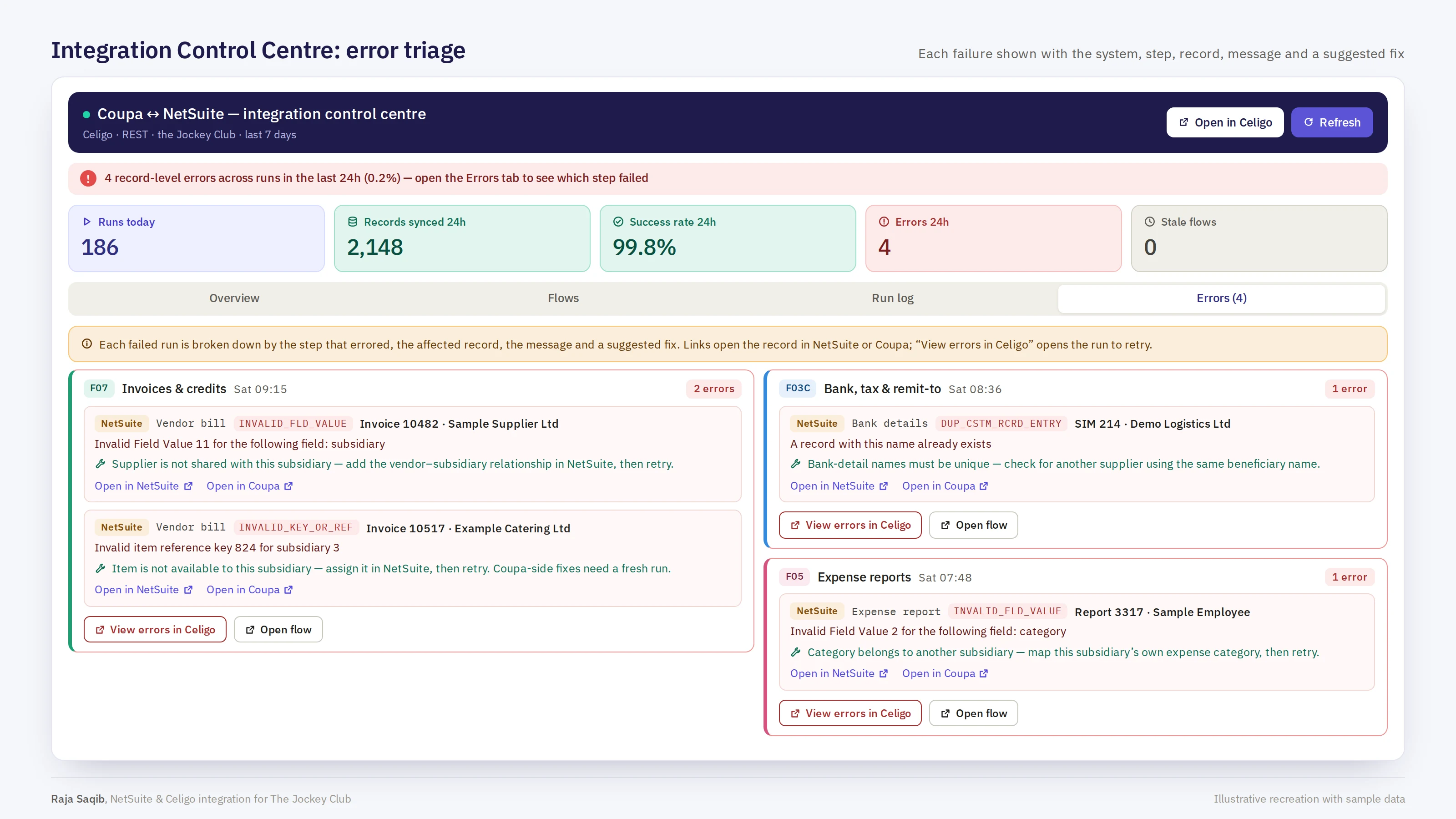
- An error dashboard for finance and support
- A suggested fix for common errors
Documentation
- A register of every flow
- A support runbook
- A handover session with your team
3What you receive
Integration health report
Every flow with its status, error profile and risks, plus a register of what connects to what.
Root-cause fixes
Fixes built and tested in sandbox, then promoted to production.
Backlog cleared and reconciled
Failed records re-run safely, with record counts matching on both sides.
Monitoring and alerts
Failures and stale flows surfaced the same day, not at month-end.
Runbook and handover
Documentation your team or support provider can use, and a handover session.
4What good monitoring looks like
Screens from The Jockey Club case study (illustrative recreations with sample data). Monitoring of this kind can be part of the sprint or a follow-on.

5Plan and timescale
- Before we start
Free scoping call
30 minutes on your platforms, flows and the problems you're seeing. You then receive a fixed price and dates in writing.
- Days 1–2
Inventory and analysis
Every flow documented and every error grouped by root cause.
- Days 3–6
Fix
Root-cause fixes built and tested in sandbox, then promoted to production.
- Days 7–8
Recover and monitor
Backlog re-run and reconciled, and monitoring and alerts switched on.
- Days 9–10
Document and hand over
Flow register, runbook and a handover session with your team.
Smaller estates of a few flows usually take about five working days.
6What I need from you
- Access to your integration platform (Celigo or Boomi) and a NetSuite integration role
- A NetSuite sandbox for testing fixes
- A contact for each connected system
- Your known issues and any existing documentation
7Who does the work
Every offer is delivered personally by Raja Saqib, a certified NetSuite consultant and CIMA-qualified accountant with more than 15 years of NetSuite implementation, integration and project recovery work, from start-ups to FTSE 250 and NASDAQ-listed groups.
SuiteHeroes is an independent NetSuite consultancy based in London, working with clients across the UK and worldwide. You deal with the consultant doing the work from the first call to the final report.
See my NetSuite experience → Read the case studies → All NetSuite consulting services →
8Common questions
Do you work with our existing platform?
Yes. I work in Celigo, Dell Boomi and native SuiteScript, and I'll fix what you have rather than push you to rebuild.
Should we move from an iPaaS to native SuiteScript?
Sometimes. It depends on volumes, number of systems and who supports it. I cover the trade-offs in native SuiteScript versus third-party iPaaS, and the sprint report will give you a recommendation.
Can you build long-term monitoring?
Yes. For larger estates, an Integration Control Centre inside NetSuite gives finance one view of every flow. See The Jockey Club case study.
Integrations failing again?
Book a free 30-minute call and get a fixed price to stabilise them.