Fixed-scope offer · NetSuite Health Check
NetSuite Health Check: a thorough review of your account, with a plan to fix what's holding you back.
A NetSuite audit and optimisation review from an independent NetSuite consultant. I review how NetSuite is set up and used across finance and operations — configuration, processes, data, scripts, integrations and performance — and give you a written report, a findings register and a prioritised optimisation plan.
1Is it right for you?
A Health Check suits any NetSuite account that has grown since go-live. It's especially useful if any of these sound familiar:
- Month-end close takes longer than it should, or depends on spreadsheets outside NetSuite
- Users say NetSuite is slow, or pages and searches time out
- You went live, but the system never quite felt finished — or your partner has moved on
- You're adding a subsidiary, module or integration and want a clean base first
- The same audit points keep coming back: approvals, segregation of duties, unreconciled balances
- Nobody is sure which scripts, workflows and saved searches are still needed
2What I check
Every area your account uses is reviewed against NetSuite best practice and your own processes. Modules you don't use are simply skipped.
Setup and configuration
The foundations everything else depends on
- Enabled features compared with what you actually use, and useful features you're missing
- Accounting preferences: posting-period controls, duplicate-number checks and approval settings
- Subsidiary hierarchy, currencies, exchange-rate updates and intercompany set-up
- Chart of accounts: structure, account types, duplicates and inactive accounts
- Departments, classes, locations and custom segments: consistency and mandatory use
- Tax set-up (SuiteTax or legacy tax): nexuses, tax codes and VAT reporting
- Transaction forms, numbering, and PDF and email templates
- Roles and permissions: segregation of duties, Administrator access, unused licences and two-factor authentication
Order to cash (O2C)
From quote to cash in the bank
- Customer records: duplicates, terms, credit limits and holds, subsidiary and tax details
- Quote, sales order, fulfilment and invoice flow, including approvals and hold rules
- Price levels, quantity pricing, discounts and promotions
- Billing: invoice forms, billing schedules, consolidated invoicing and credit memos
- Returns: return authorisations, refunds and credits
- Cash application: customer payments, deposits, unapplied cash and bank matching
- Collections: AR ageing, statements and dunning
- Orders fulfilled but never billed
Procure to pay (P2P)
From requisition to supplier payment
- Vendor records: duplicates, terms, subsidiaries, tax registration and bank-detail change control
- Purchase requisitions and purchase orders, approval routing and limits
- Three-way match between purchase order, receipt and bill, including tolerances
- Vendor bill approval, duplicate-bill checks and bill capture
- Vendor payments: electronic bank payments, payment runs and early-payment discounts
- Unapplied vendor credits and prepayments
- Expense reports and corporate card transactions
- Accruals for goods received but not billed, and AP ageing
Record to report (R2R)
A faster, controlled month-end close
- Period close: close checklist, period locks and subledger reconciliations
- Journals: approvals, recurring entries and reversing accruals
- Bank and credit card reconciliation, bank feeds and matching rules
- Intercompany transactions and eliminations
- Foreign-currency revaluation and consolidated exchange rates
- Allocations, budgets and statistical accounts
- Financial statements, report layouts, KPIs and dashboards
- Audit trail and system notes on sensitive changes
Fixed assets
Fixed Assets Management
- Asset types, depreciation methods, conventions and account mapping
- Asset register reconciled to the balance sheet
- Assets created from bills and journals, including asset proposals and assets under construction
- Depreciation runs and schedules, including gaps and catch-up entries
- Disposals, transfers, revaluations and impairments
- Alternate depreciation methods and Multi-Book, where used
Advanced revenue recognition
Advanced Revenue Management (IFRS 15 / ASC 606)
- Revenue recognition rules, plan templates and item revenue settings
- Revenue arrangements and elements created for every relevant transaction
- Standalone selling prices (fair value) and allocation
- Revenue plans that are blocked, on hold or never recognised
- Recognition journals, with deferred revenue reconciled to the balance sheet
- Contract changes and modifications
- IFRS 15 and ASC 606 reporting, with Multi-Book where used
Items
The item master behind every transaction
- Item types used correctly: inventory, non-inventory, service, kits, assemblies, other charges and discounts
- Income, cost of goods sold, asset and expense accounts on each item
- Subsidiaries, tax schedules and units of measure
- Duplicate and inactive items, naming conventions and mandatory fields
- Pricing and costing settings
- Revenue recognition and amortisation settings on items
Inventory
Stock you can trust in the ledger
- Locations, bins and costing method (average, FIFO, LIFO or standard)
- Negative inventory settings and their effect on costing
- Inventory counts, adjustments, transfers and stock in transit
- Inventory valuation reconciled to the general ledger
- Landed cost allocation
- Back orders, committed stock, and receiving and fulfilment processes
Advanced inventory
Advanced Inventory Management
- Demand planning: demand and supply plans and their settings
- Auto-calculated reorder points, preferred stock levels and safety stock
- Multi-location fulfilment and distribution
- Lot and serial number tracking
- Bin management and inventory status
- Warehouse Management System set-up, where used
Advanced procurement
Contracts, blanket orders and RFQs
- Purchase contracts, pricing tiers and their use on orders
- Blanket purchase orders
- Requisitions and requests for quote
- Vendor return authorisations
- Approval rules, routing and procurement dashboards
Projects
SuiteProjects
- Project templates, tasks and milestones
- Resource allocation and capacity
- Time and expense capture and approvals
- Billing types (time and materials, fixed bid, charge-based) and charge rules
- Project budgets, profitability and work in progress
- Revenue recognition on projects
Performance with APM
Using Oracle's Application Performance Management (APM) SuiteApp
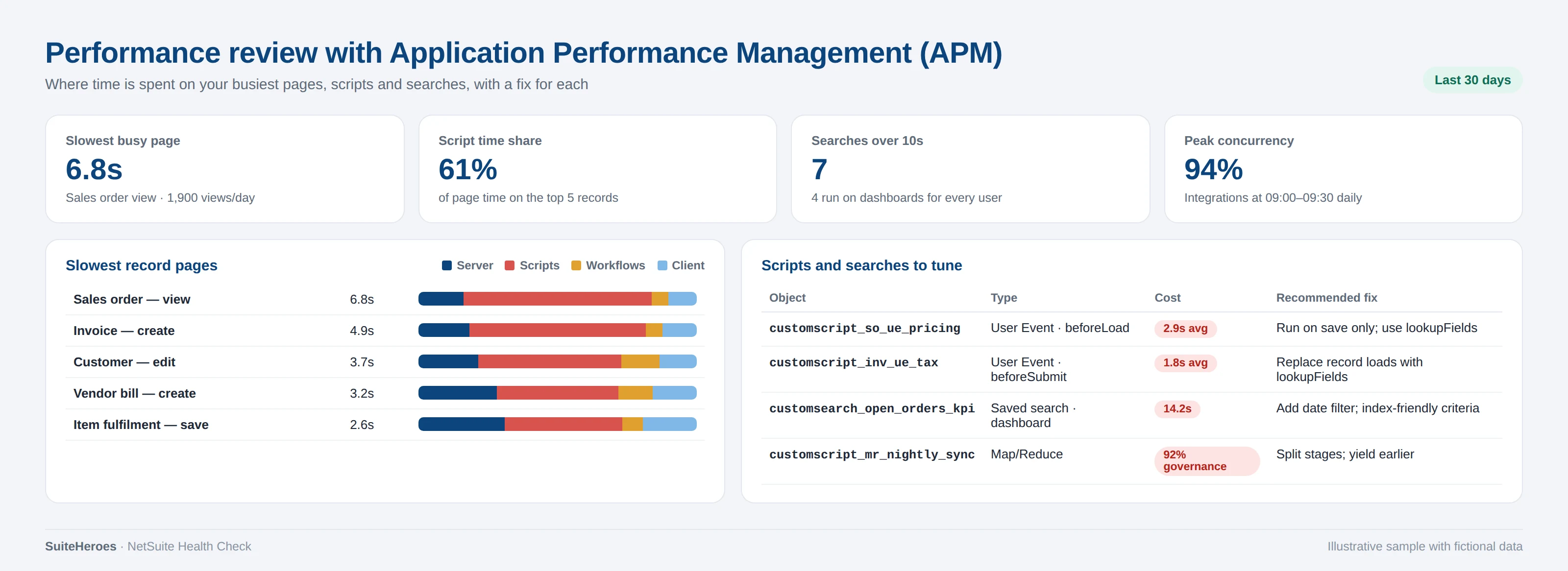
- Page load times on your busiest records, split into server, script, workflow and client time
- User event and client script performance, and SuiteScript governance usage
- Slow saved searches and dashboard portlets
- Integration and web-service concurrency at peak times
- Scheduled and Map/Reduce jobs that clash with working hours
- A specific fix for each: script refactoring, form trimming, search tuning or rescheduling
Integrations and customisations
Included in the Complete review
- Every integration: Celigo, Dell Boomi, native SuiteScript and SuiteTalk REST/SOAP
- Error rates, retries, duplicate handling and monitoring
- Token-based authentication and OAuth, and who owns each credential
- Scripts, workflows and saved searches: what's used, redundant or undocumented
- SuiteApps and bundles: versions and ownership
3What you receive
Health Check report
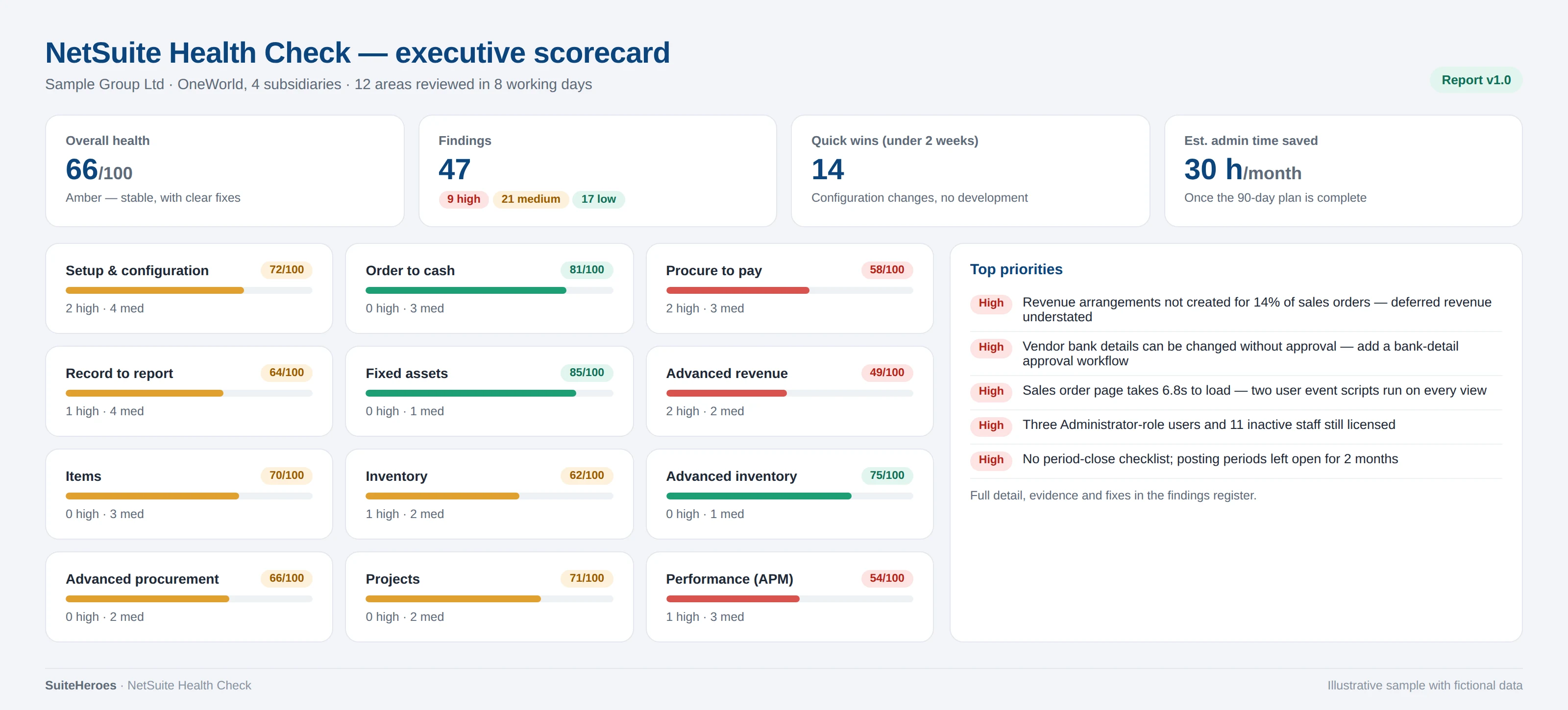
An executive summary with a scorecard for every area reviewed, then detailed findings with the evidence behind each one.
Findings register
A spreadsheet of every finding: severity, business impact, effort, recommended fix and a suggested owner.
Optimisation plan
Quick wins (0–2 weeks), the next 90 days and a 3–12 month roadmap, with a fixed price for any work you'd like me to do.
Performance review
Your slowest pages, scripts and searches from APM, each with a specific fix.
Walkthrough session
60 minutes with your finance and systems leads to go through the findings and agree priorities.
Follow-up questions
30 days of follow-up questions by email while your team works through the plan.
4What the deliverables look like
Illustrative samples with fictional data. Your report follows the same structure, built from your account.

Download a sample Health Check report
A 15-page sample of a real report with fictional data: executive summary, scorecard, six findings with step-by-step fixes, tests and rollback, the APM tuning plan, a 12-week remediation plan and two worked fix guides.
5Plan and timescale
- Before we start
Free scoping call
30 minutes on your modules, subsidiaries, integrations and pain points. You then receive a fixed price and dates in writing.
- Day 1
Kick-off and access
A 60-minute kick-off. Your administrator creates a read-only role for me, and process owners receive a short questionnaire.
- Days 2–5
Review
Configuration and processes area by area, saved searches and reports, scripts and workflows, and APM performance data, plus 30-minute conversations with each process owner.
- Days 6–8
Analysis
Findings checked against your data, rated by impact and effort, and sequenced into the optimisation plan.
- Days 9–10
Report and walkthrough
The report, findings register and plan are delivered, followed by the walkthrough session with your team.
Single-subsidiary accounts usually finish in about five working days. Multi-subsidiary accounts with integrations take up to ten.
6Pricing
One fixed price, confirmed in writing after the scoping call, so there are no surprises.
Core
£2,500
For a single company, or up to two subsidiaries, using core financials.
- Setup and configuration
- Order to cash, procure to pay and record to report
- Items
- Performance review with APM
- About 5 working days
Extended
£4,000 – £6,000
Everything in Core, plus the add-on modules you use. The price depends on how many.
- Fixed assets
- Advanced revenue recognition
- Inventory and advanced inventory
- Advanced procurement
- Projects
Complete
£7,500
Everything in Extended, across all your subsidiaries, plus your integrations.
- Integrations and customisations review
- All subsidiaries
- Up to 10 working days
7What I need from you
- A NetSuite role with view access to setup, transactions, scripts and APM. I'll send the exact permission list.
- The APM SuiteApp installed. I can walk your administrator through it if it isn't already.
- 30 minutes with each process owner, such as finance, purchasing and operations.
- Any design documents, known issues or recent audit points you already have.
8Who does the work
Every offer is delivered personally by Raja Saqib, a certified NetSuite consultant and CIMA-qualified accountant with more than 15 years of NetSuite implementation, integration and project recovery work, from start-ups to FTSE 250 and NASDAQ-listed groups.
SuiteHeroes is an independent NetSuite consultancy based in London, working with clients across the UK and worldwide. You deal with the consultant doing the work from the first call to the final report.
See my NetSuite experience → Read the case studies → All NetSuite consulting services →
9Common questions
Is a NetSuite Health Check the same as a NetSuite audit?
Yes, in practice. Both names describe an independent review of how NetSuite is configured and used. This one goes further than a checklist, with a prioritised optimisation plan and a performance review.
Why not just hire a NetSuite consultant by the day?
You can, and I do day-rate work too. A Health Check gives you a fixed price and a complete picture first, so any further work is focused on what matters most.
Will you change anything in our account?
No. The Health Check is read-only. Fixing what's found is a separate, optional piece of work.
Can you fix what you find?
Yes. Most quick wins take days, not weeks. I'll give you a fixed price for any work in the plan, or your own team or partner can follow the plan.
We already have a NetSuite partner. Is that a problem?
Not at all. The report is independent and written so any partner or in-house team can act on it.
How do you keep our data secure?
I work through a read-only role and I'm happy to sign your NDA. The report contains only the screenshots and figures needed to evidence each finding.
Ready for a clear view of your NetSuite?
Book a free 30-minute scoping call. You'll get a fixed price and dates in writing.